
Bạn là lập trình viên và đang thầm thích ai đó nhưng chưa biết tỏ tình sao cho thật độc đáo, không đụng hàng? Đừng lo! Trend code trái tim đang gây sốt chính là vũ khí bí mật. Bài viết này sẽ bật mí 5 mẫu code trái tim HTML/CSS cực đẹp, cực độc kèm hướng dẫn chi tiết. Tự tay tạo món quà tình yêu công nghệ, đảm bảo crush sẽ đổ gục ngay tức thì!
Nội dung
- 1. Trend code trái tim là gì?
- 2. Khám phá top 5 mẫu Code Trái Tim HTML/CSS
- 2.1 Mẫu 1: Trái Tim Đơn Giản, Tinh Tế – Vẻ Đẹp Đến Từ Sự Tối Giản
- 2.2 Mẫu 2: Trái Tim Đập Rung Rinh – Khi Tình Yêu Thổn Thức
- 2.3 Mẫu 3: Trái Tim Lấp Lánh Sao Băng – Tình Yêu Của Vì Sao
- 2.4 Mẫu 4: Trái Tim Có Tên Crush – Tuyên Ngôn Tình Yêu Độc Quyền
- 2.5 Mẫu 5: Trái Tim Thủ Khoa Lý – Đẳng Cấp Dân Công Nghệ!
- 3. Hướng Dẫn Gửi Gắm Yêu Thương Bằng Code Trái Tim
- 4. FAQ Về Trend Code Trái Tim
- Làm sao để tải code trái tim miễn phí ở đâu?
- Em không rành code lắm, có làm được code trái tim đập có tên đơn giản không?
- Có thể dùng code trái tim python để làm những hiệu ứng tương tự không?
- Em muốn tìm thêm link code trái tim html để tham khảo thì tìm ở đâu?
- Cách làm code trái tim có tên có khó không? Cần lưu ý gì?
- 5. Lời Kết: Mã Hóa Yêu Thương, Chinh Phục Crush Thành Công
1. Trend code trái tim là gì?
Bạn tò mò vì sao những đoạn code nhỏ bé lại có sức mạnh đốn tim ghê gớm đến vậy? Hãy cùng khám phá hiện tượng thú vị này nhé!
Bạn đã bao giờ nghĩ những dòng code khô khan có thể biến thành lời tỏ tình ngọt ngào? Đó chính là sức hút của code trái tim! Đơn giản, đây là những đoạn mã HTML và CSS giúp học sinh, sinh viên yêu công nghệ tạo ra hình ảnh trái tim sống động, đa dạng hiệu ứng ngay trên trình duyệt web. Nó không chỉ là hình ảnh, mà là tuyên ngôn tình yêu đậm chất công nghệ, thể hiện sự sáng tạo và tâm huyết của bạn!
Vậy tại sao trend code trái tim lại được yêu thích đến thế, đặc biệt trong cộng đồng Gen Z và Gen Alpha?
- Sự độc đáo, không đụng hàng: Những cách thể hiện tình cảm sáng tạo như vậy luôn gây ấn tượng mạnh và được đánh giá cao hơn hẳn so với các phương pháp truyền thống.
- Cá nhân hóa cực đỉnh: Bạn dễ dàng tùy chỉnh màu sắc, kích thước, hiệu ứng, thậm chí chèn tên crush vào để món quà thêm ý nghĩa, mang đậm dấu ấn cá nhân của cả hai.
- Thỏa mãn đam mê vọc vạch: Với những bạn trẻ có sở thích tìm tòi, vọc vạch công nghệ cơ bản, việc tự tay tạo ra một code trái tim là cơ hội tuyệt vời để thể hiện tài năng và sự khéo léo của mình.
- Hiệu ứng lan truyền mạnh mẽ: Đồ xịn thì phải khoe chứ! Các mẫu code trái tim độc đáo thường được chia sẻ rầm rộ trên mạng xã hội, tạo thành một trend code trái tim khiến ai cũng muốn thử sức.
2. Khám phá top 5 mẫu Code Trái Tim HTML/CSS
Đã đến lúc thể hiện tài năng rồi! Dưới đây là 5 mẫu code trái tim ấn tượng, từ đơn giản đến phức tạp, kèm hướng dẫn chi tiết để bạn tự tay tạo món quà tỏ tình độc quyền cho crush. Mỗi mẫu code có điểm nhấn riêng, đảm bảo crush của bạn sẽ phải ngạc nhiên đấy!
2.1 Mẫu 1: Trái Tim Đơn Giản, Tinh Tế – Vẻ Đẹp Đến Từ Sự Tối Giản
Đôi khi, sự đơn giản lại là chìa khóa của vẻ đẹp. Mẫu trái tim này sẽ mang đến một vẻ ngoài thanh lịch, hiện đại nhưng vẫn đầy cuốn hút.
-
Mô tả: Đây là một trái tim màu đỏ kinh điển, không hề nhàm chán! Nó được nâng cấp với hiệu ứng đổ bóng nhẹ hoặc gradient màu sắc tinh tế, tạo cảm giác mềm mại, chiều sâu và hiện đại. Phù hợp cho những bạn thích sự thanh lịch, không quá cầu kỳ nhưng vẫn muốn gây ấn tượng.
-
Điểm nổi bật:
- Dễ dàng tùy chỉnh màu sắc (từ đỏ truyền thống đến hồng pastel, tím mộng mơ…), kích thước, và độ đậm nhạt của đổ bóng.
- Là điểm khởi đầu tuyệt vời cho những bạn mới làm quen với code, giúp bạn hiểu rõ cấu trúc cơ bản của một trái tim bằng CSS.
<!DOCTYPE HTML PUBLIC "-//W3C//DTD HTML 4.0 Transitional//EN">

<HTML>

 <HEAD>

  <TITLE> New Document </TITLE>

  <META NAME="Generator" CONTENT="EditPlus">

  <META NAME="Author" CONTENT="">

  <META NAME="Keywords" CONTENT="">

  <META NAME="Description" CONTENT="">

  <style>

  html, body {

  height: 100%;

  padding: 0;

  margin: 0;

  background: #000;

}

canvas {

  position: absolute;

  width: 100%;

  height: 100%;

}

  </style>

 </HEAD>


 <BODY>

  <canvas id="pinkboard"></canvas>

  <script>

  /*

 * Settings

 */

var settings = {

  particles: {

    length:   500, // maximum amount of particles

    duration:   2, // particle duration in sec

    velocity: 100, // particle velocity in pixels/sec

    effect: -0.75, // play with this for a nice effect

    size:      30, // particle size in pixels

  },

};


/*

 * RequestAnimationFrame polyfill by Erik Möller

 */

(function(){var b=0;var c=["ms","moz","webkit","o"];for(var a=0;a<c.length&&!window.requestAnimationFrame;++a){window.requestAnimationFrame=window[c[a]+"RequestAnimationFrame"];window.cancelAnimationFrame=window[c[a]+"CancelAnimationFrame"]||window[c[a]+"CancelRequestAnimationFrame"]}if(!window.requestAnimationFrame){window.requestAnimationFrame=function(h,e){var d=new Date().getTime();var f=Math.max(0,16-(d-b));var g=window.setTimeout(function(){h(d+f)},f);b=d+f;return g}}if(!window.cancelAnimationFrame){window.cancelAnimationFrame=function(d){clearTimeout(d)}}}());


/*

 * Point class

 */

var Point = (function() {

  function Point(x, y) {

    this.x = (typeof x !== 'undefined') ? x : 0;

    this.y = (typeof y !== 'undefined') ? y : 0;

  }

  Point.prototype.clone = function() {

    return new Point(this.x, this.y);

  };

  Point.prototype.length = function(length) {

    if (typeof length == 'undefined')

      return Math.sqrt(this.x * this.x + this.y * this.y);

    this.normalize();

    this.x *= length;

    this.y *= length;

    return this;

  };

  Point.prototype.normalize = function() {

    var length = this.length();

    this.x /= length;

    this.y /= length;

    return this;

  };

  return Point;

})();


/*

 * Particle class

 */

var Particle = (function() {

  function Particle() {

    this.position = new Point();

    this.velocity = new Point();

    this.acceleration = new Point();

    this.age = 0;

  }

  Particle.prototype.initialize = function(x, y, dx, dy) {

    this.position.x = x;

    this.position.y = y;

    this.velocity.x = dx;

    this.velocity.y = dy;

    this.acceleration.x = dx * settings.particles.effect;

    this.acceleration.y = dy * settings.particles.effect;

    this.age = 0;

  };

  Particle.prototype.update = function(deltaTime) {

    this.position.x += this.velocity.x * deltaTime;

    this.position.y += this.velocity.y * deltaTime;

    this.velocity.x += this.acceleration.x * deltaTime;

    this.velocity.y += this.acceleration.y * deltaTime;

    this.age += deltaTime;

  };

  Particle.prototype.draw = function(context, image) {

    function ease(t) {

      return (--t) * t * t + 1;

    }

    var size = image.width * ease(this.age / settings.particles.duration);

    context.globalAlpha = 1 - this.age / settings.particles.duration;

    context.drawImage(image, this.position.x - size / 2, this.position.y - size / 2, size, size);

  };

  return Particle;

})();


/*

 * ParticlePool class

 */

var ParticlePool = (function() {

  var particles,

      firstActive = 0,

      firstFree   = 0,

      duration    = settings.particles.duration;


  function ParticlePool(length) {

    // create and populate particle pool

    particles = new Array(length);

    for (var i = 0; i < particles.length; i++)

      particles[i] = new Particle();

  }

  ParticlePool.prototype.add = function(x, y, dx, dy) {

    particles[firstFree].initialize(x, y, dx, dy);


    // handle circular queue

    firstFree++;

    if (firstFree   == particles.length) firstFree   = 0;

    if (firstActive == firstFree       ) firstActive++;

    if (firstActive == particles.length) firstActive = 0;

  };

  ParticlePool.prototype.update = function(deltaTime) {

    var i;


    // update active particles

    if (firstActive < firstFree) {

      for (i = firstActive; i < firstFree; i++)

        particles[i].update(deltaTime);

    }

    if (firstFree < firstActive) {

      for (i = firstActive; i < particles.length; i++)

        particles[i].update(deltaTime);

      for (i = 0; i < firstFree; i++)

        particles[i].update(deltaTime);

    }


    // remove inactive particles

    while (particles[firstActive].age >= duration && firstActive != firstFree) {

      firstActive++;

      if (firstActive == particles.length) firstActive = 0;

    }


  };

  ParticlePool.prototype.draw = function(context, image) {

    // draw active particles

    if (firstActive < firstFree) {

      for (i = firstActive; i < firstFree; i++)

        particles[i].draw(context, image);

    }

    if (firstFree < firstActive) {

      for (i = firstActive; i < particles.length; i++)

        particles[i].draw(context, image);

      for (i = 0; i < firstFree; i++)

        particles[i].draw(context, image);

    }

  };

  return ParticlePool;

})();


/*

 * Putting it all together

 */

(function(canvas) {

  var context = canvas.getContext('2d'),

      particles = new ParticlePool(settings.particles.length),

      particleRate = settings.particles.length / settings.particles.duration, // particles/sec

      time;


  // get point on heart with -PI <= t <= PI

  function pointOnHeart(t) {

    return new Point(

      160 * Math.pow(Math.sin(t), 3),

      130 * Math.cos(t) - 50 * Math.cos(2 * t) - 20 * Math.cos(3 * t) - 10 * Math.cos(4 * t) + 25

    );

  }


  // creating the particle image using a dummy canvas

  var image = (function() {

    var canvas  = document.createElement('canvas'),

        context = canvas.getContext('2d');

    canvas.width  = settings.particles.size;

    canvas.height = settings.particles.size;

    // helper function to create the path

    function to(t) {

      var point = pointOnHeart(t);

      point.x = settings.particles.size / 2 + point.x * settings.particles.size / 350;

      point.y = settings.particles.size / 2 - point.y * settings.particles.size / 350;

      return point;

    }

    // create the path

    context.beginPath();

    var t = -Math.PI;

    var point = to(t);

    context.moveTo(point.x, point.y);

    while (t < Math.PI) {

      t += 0.01; // baby steps!

      point = to(t);

      context.lineTo(point.x, point.y);

    }

    context.closePath();

    // create the fill

    context.fillStyle = '#ea80b0';

    context.fill();

    // create the image

    var image = new Image();

    image.src = canvas.toDataURL();

    return image;

  })();


  // render that thing!

  function render() {

    // next animation frame

    requestAnimationFrame(render);


    // update time

    var newTime   = new Date().getTime() / 1000,

        deltaTime = newTime - (time || newTime);

    time = newTime;


    // clear canvas

    context.clearRect(0, 0, canvas.width, canvas.height);


    // create new particles

    var amount = particleRate * deltaTime;

    for (var i = 0; i < amount; i++) {

      var pos = pointOnHeart(Math.PI - 2 * Math.PI * Math.random());

      var dir = pos.clone().length(settings.particles.velocity);

      particles.add(canvas.width / 2 + pos.x, canvas.height / 2 - pos.y, dir.x, -dir.y);

    }


    // update and draw particles

    particles.update(deltaTime);

    particles.draw(context, image);

  }


  // handle (re-)sizing of the canvas

  function onResize() {

    canvas.width  = canvas.clientWidth;

    canvas.height = canvas.clientHeight;

  }

  window.onresize = onResize;


  // delay rendering bootstrap

  setTimeout(function() {

    onResize();

    render();

  }, 10);

})(document.getElementById('pinkboard'));

  </script>

 </BODY>

</HTML>
2.2 Mẫu 2: Trái Tim Đập Rung Rinh – Khi Tình Yêu Thổn Thức
Bạn muốn trái tim mình thổn thức gửi đến crush? Mẫu code này sẽ giúp bạn làm điều đó một cách lãng mạn nhất!
-
Mô tả: Một trái tim không chỉ đứng yên mà còn đập nhẹ nhàng, mô phỏng nhịp đập của trái tim đang yêu. Hiệu ứng này siêu lãng mạn và chắc chắn gây ấn tượng mạnh, khiến người ấy cảm nhận được sự chân thành của bạn.
-
Điểm nổi bật: Sử dụng thuộc tính
animationtrong CSS để tạo hiệu ứng động. Bạn có thể dễ dàng điều chỉnh tốc độ đập (nhanh, chậm, vừa phải) để phù hợp với nhịp tim của mình.
<!DOCTYPE HTML PUBLIC "-//W3C//DTD HTML 4.0 Transitional//EN">
<HTML>
 <HEAD>
  <TITLE> MINH IT </TITLE>
  <META NAME="Generator" CONTENT="EditPlus">
  <META NAME="Author" CONTENT="">
  <META NAME="Keywords" CONTENT="">
  <META NAME="Description" CONTENT="">
  <link rel="stylesheet" href="style.css">
  <style>
  html, body {
  height: 100%;
  padding: 0;
  margin: 0;
  background: rgba(0, 0, 0, 0.851);
}
canvas {
  position: absolute;
  width: 100%;
  height: 100%;
}
  </style>
 </HEAD>
 <BODY>
  <div class="box">
    <canvas id="pinkboard"></canvas>
  </div>
<script>
var settings = {
  particles: {
    length:   10000, // maximum amount of particles
    duration:   4, // particle duration in sec
    velocity: 80, // particle velocity in pixels/sec
    effect: -1.3, // play with this for a nice effect
    size:      8, // particle size in pixels
  },
};
/*
 */
(function(){var b=0;var c=["ms","moz","webkit","o"];for(var a=0;a<c.length&&!window.requestAnimationFrame;++a){window.requestAnimationFrame=window[c[a]+"RequestAnimationFrame"];window.cancelAnimationFrame=window[c[a]+"CancelAnimationFrame"]||window[c[a]+"CancelRequestAnimationFrame"]}if(!window.requestAnimationFrame){window.requestAnimationFrame=function(h,e){var d=new Date().getTime();var f=Math.max(0,16-(d-b));var g=window.setTimeout(function(){h(d+f)},f);b=d+f;return g}}if(!window.cancelAnimationFrame){window.cancelAnimationFrame=function(d){clearTimeout(d)}}}());
/*
 * Point class
 */
var Point = (function() {
  function Point(x, y) {
    this.x = (typeof x !== 'undefined') ? x : 0;
    this.y = (typeof y !== 'undefined') ? y : 0;
  }
  Point.prototype.clone = function() {
    return new Point(this.x, this.y);
  };
  Point.prototype.length = function(length) {
    if (typeof length == 'undefined')
      return Math.sqrt(this.x * this.x + this.y * this.y);
    this.normalize();
    this.x *= length;
    this.y *= length;
    return this;
  };
  Point.prototype.normalize = function() {
    var length = this.length();
    this.x /= length;
    this.y /= length;
    return this;
  };
  return Point;
})();
/*
 * Particle class
 */
var Particle = (function() {
  function Particle() {
    this.position = new Point();
    this.velocity = new Point();
    this.acceleration = new Point();
    this.age = 0;
  }
  Particle.prototype.initialize = function(x, y, dx, dy) {
    this.position.x = x;
    this.position.y = y;
    this.velocity.x = dx;
    this.velocity.y = dy;
    this.acceleration.x = dx * settings.particles.effect;
    this.acceleration.y = dy * settings.particles.effect;
    this.age = 0;
  };
  Particle.prototype.update = function(deltaTime) {
    this.position.x += this.velocity.x * deltaTime;
    this.position.y += this.velocity.y * deltaTime;
    this.velocity.x += this.acceleration.x * deltaTime;
    this.velocity.y += this.acceleration.y * deltaTime;
    this.age += deltaTime;
  };
  Particle.prototype.draw = function(context, image) {
    function ease(t) {
      return (--t) * t * t + 1;
    }
    var size = image.width * ease(this.age / settings.particles.duration);
    context.globalAlpha = 1 - this.age / settings.particles.duration;
    context.drawImage(image, this.position.x - size / 2, this.position.y - size / 2, size, size);
  };
  return Particle;
})();
/*
 * ParticlePool class
 */
var ParticlePool = (function() {
  var particles,
      firstActive = 0,
      firstFree   = 0,
      duration    = settings.particles.duration;

  function ParticlePool(length) {
    // create and populate particle pool
    particles = new Array(length);
    for (var i = 0; i < particles.length; i++)
      particles[i] = new Particle();
  }
  ParticlePool.prototype.add = function(x, y, dx, dy) {
    particles[firstFree].initialize(x, y, dx, dy);

    // handle circular queue
    firstFree++;
    if (firstFree   == particles.length) firstFree   = 0;
    if (firstActive == firstFree       ) firstActive++;
    if (firstActive == particles.length) firstActive = 0;
  };
  ParticlePool.prototype.update = function(deltaTime) {
    var i;

    // update active particles
    if (firstActive < firstFree) {
      for (i = firstActive; i < firstFree; i++)
        particles[i].update(deltaTime);
    }
    if (firstFree < firstActive) {
      for (i = firstActive; i < particles.length; i++)
        particles[i].update(deltaTime);
      for (i = 0; i < firstFree; i++)
        particles[i].update(deltaTime);
    }

    // remove inactive particles
    while (particles[firstActive].age >= duration && firstActive != firstFree) {
      firstActive++;
      if (firstActive == particles.length) firstActive = 0;
    }


  };
  ParticlePool.prototype.draw = function(context, image) {
    // draw active particles
    if (firstActive < firstFree) {
      for (i = firstActive; i < firstFree; i++)
        particles[i].draw(context, image);
    }
    if (firstFree < firstActive) {
      for (i = firstActive; i < particles.length; i++)
        particles[i].draw(context, image);
      for (i = 0; i < firstFree; i++)
        particles[i].draw(context, image);
    }
  };
  return ParticlePool;
})();
/*
 * Putting it all together
 */
(function(canvas) {
  var context = canvas.getContext('2d'),
      particles = new ParticlePool(settings.particles.length),
      particleRate = settings.particles.length / settings.particles.duration, // particles/sec
      time;

  // get point on heart with -PI <= t <= PI
  function pointOnHeart(t) {
    return new Point(
      160 * Math.pow(Math.sin(t), 3),
      130 * Math.cos(t) - 50 * Math.cos(2 * t) - 20 * Math.cos(3 * t) - 10 * Math.cos(4 * t) + 25
    );
  }

  // creating the particle image using a dummy canvas
  var image = (function() {
    var canvas  = document.createElement('canvas'),
        context = canvas.getContext('2d');
    canvas.width  = settings.particles.size;
    canvas.height = settings.particles.size;
    // helper function to create the path
    function to(t) {
      var point = pointOnHeart(t);
      point.x = settings.particles.size / 2 + point.x * settings.particles.size / 350;
      point.y = settings.particles.size / 2 - point.y * settings.particles.size / 350;
      return point;
    }
    // create the path
    context.beginPath();
    var t = -Math.PI;
    var point = to(t);
    context.moveTo(point.x, point.y);
    while (t < Math.PI) {
      t += 0.01; // baby steps!
      point = to(t);
      context.lineTo(point.x, point.y);
    }
    context.closePath();
    // create the fill
    context.fillStyle = '#f50b02';
    context.fill();
    // create the image
    var image = new Image();
    image.src = canvas.toDataURL();
    return image;
  })();

  // render that thing!
  function render() {
    // next animation frame
    requestAnimationFrame(render);

    // update time
    var newTime   = new Date().getTime() / 1000,
        deltaTime = newTime - (time || newTime);
    time = newTime;

    // clear canvas
    context.clearRect(0, 0, canvas.width, canvas.height);

    // create new particles
    var amount = particleRate * deltaTime;
    for (var i = 0; i < amount; i++) {
      var pos = pointOnHeart(Math.PI - 2 * Math.PI * Math.random());
      var dir = pos.clone().length(settings.particles.velocity);
      particles.add(canvas.width / 2 + pos.x, canvas.height / 2 - pos.y, dir.x, -dir.y);
    }

    // update and draw particles
    particles.update(deltaTime);
    particles.draw(context, image);
  }

  // handle (re-)sizing of the canvas
  function onResize() {
    canvas.width  = canvas.clientWidth;
    canvas.height = canvas.clientHeight;
  }
  window.onresize = onResize;

  // delay rendering bootstrap
  setTimeout(function() {
    onResize();
    render();
  }, 10);
})(document.getElementById('pinkboard'));

  </script>
 </BODY>
</HTML>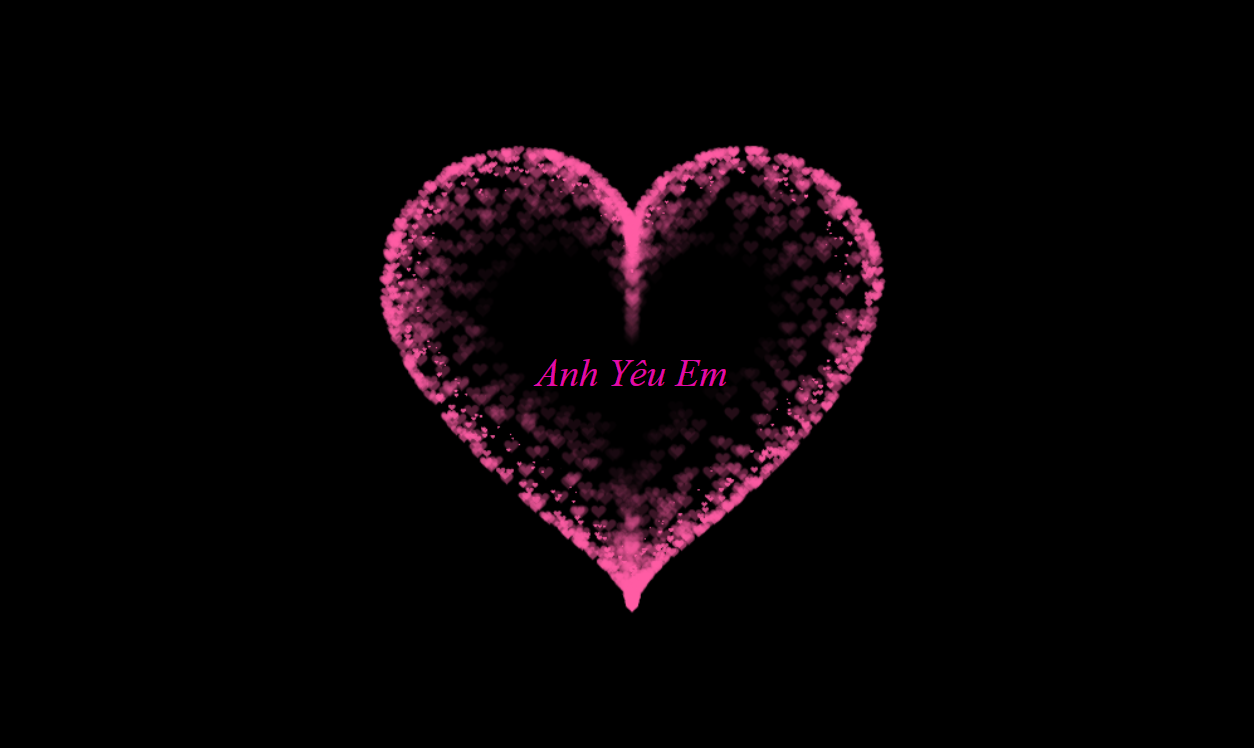
2.3 Mẫu 3: Trái Tim Lấp Lánh Sao Băng – Tình Yêu Của Vì Sao
Muốn tỏ tình crush bằng một trái tim ảo diệu như dải ngân hà? Mẫu trái tim lấp lánh này chính là dành cho bạn!
-
Mô tả: Trái tim không chỉ đập mà còn phát ra những hạt lấp lánh nhỏ li ti như bụi sao, tạo cảm giác huyền ảo và lung linh. Cực kỳ ảo diệu, chắc chắn thu hút mọi ánh nhìn, khiến crush cảm thấy như đang lạc vào một câu chuyện cổ tích vậy!
-
Điểm nổi bật: Kết hợp khéo léo hiệu ứng
box-shadowhoặcpseudo-elements(::before,::after) để tạo ra các điểm sáng lấp lánh xung quanh trái tim. Bạn có thể thay đổi màu sắc của hạt lấp lánh và số lượng chúng để tạo hiệu ứng mong muốn.
<!DOCTYPE html>
<html lang="en">
<head>
    <meta charset="UTF-8">
    <meta http-equiv="X-UA-Compatible" content="IE=edge">
    <meta name="viewport" content="width=device-width, initial-scale=1.0">
    <title>Document</title>
    <style>
        canvas {
            position: absolute;
            left: 0;
            top: 0;
            width: 100%;
            height: 100%;
            background-color: rgba(0, 0, 0, .2);
        }
    </style>
</head>
<body>
    <canvas id="heart"></canvas>

    <script>
        window.requestAnimationFrame =
            window.__requestAnimationFrame ||
            window.requestAnimationFrame ||
            window.webkitRequestAnimationFrame ||
            window.mozRequestAnimationFrame ||
            window.oRequestAnimationFrame ||
            window.msRequestAnimationFrame ||
            (function () {
                return function (callback, element) {
                    var lastTime = element.__lastTime;
                    if (lastTime === undefined) {
                        lastTime = 0;
                    }
                    var currTime = Date.now();
                    var timeToCall = Math.max(1, 33 - (currTime - lastTime));
                    window.setTimeout(callback, timeToCall);
                    element.__lastTime = currTime + timeToCall;
                };
            })();
        window.isDevice = (/android|webos|iphone|ipad|ipod|blackberry|iemobile|opera mini/i.test(((navigator.userAgent || navigator.vendor || window.opera)).toLowerCase()));
        var loaded = false;
        var init = function () {
            if (loaded) return;
            loaded = true;
            var mobile = window.isDevice;
            var koef = mobile ? 0.5 : 1;
            var canvas = document.getElementById('heart');
            var ctx = canvas.getContext('2d');
            var width = canvas.width = koef * innerWidth;
            var height = canvas.height = koef * innerHeight;
            var rand = Math.random;
            ctx.fillStyle = "rgba(0,0,0,1)";
            ctx.fillRect(0, 0, width, height);

            var heartPosition = function (rad) {
                //return [Math.sin(rad), Math.cos(rad)];
                return [Math.pow(Math.sin(rad), 3), -(15 * Math.cos(rad) - 5 * Math.cos(2 * rad) - 2 * Math.cos(3 * rad) - Math.cos(4 * rad))];
            };
            var scaleAndTranslate = function (pos, sx, sy, dx, dy) {
                return [dx + pos[0] * sx, dy + pos[1] * sy];
            };

            window.addEventListener('resize', function () {
                width = canvas.width = koef * innerWidth;
                height = canvas.height = koef * innerHeight;
                ctx.fillStyle = "rgba(0,0,0,1)";
                ctx.fillRect(0, 0, width, height);
            });

            var traceCount = mobile ? 20 : 50;
            var pointsOrigin = [];
            var i;
            var dr = mobile ? 0.3 : 0.1;
            for (i = 0; i < Math.PI * 2; i += dr) pointsOrigin.push(scaleAndTranslate(heartPosition(i), 210, 13, 0, 0));
            for (i = 0; i < Math.PI * 2; i += dr) pointsOrigin.push(scaleAndTranslate(heartPosition(i), 150, 9, 0, 0));
            for (i = 0; i < Math.PI * 2; i += dr) pointsOrigin.push(scaleAndTranslate(heartPosition(i), 90, 5, 0, 0));
            var heartPointsCount = pointsOrigin.length;

            var targetPoints = [];
            var pulse = function (kx, ky) {
                for (i = 0; i < pointsOrigin.length; i++) {
                    targetPoints[i] = [];
                    targetPoints[i][0] = kx * pointsOrigin[i][0] + width / 2;
                    targetPoints[i][1] = ky * pointsOrigin[i][1] + height / 2;
                }
            };

            var e = [];
            for (i = 0; i < heartPointsCount; i++) {
                var x = rand() * width;
                var y = rand() * height;
                e[i] = {
                    vx: 0,
                    vy: 0,
                    R: 2,
                    speed: rand() + 5,
                    q: ~~(rand() * heartPointsCount),
                    D: 2 * (i % 2) - 1,
                    force: 0.2 * rand() + 0.7,
                    f: "hsla(0," + ~~(40 * rand() + 60) + "%," + ~~(60 * rand() + 20) + "%,.3)",
                    trace: []
                };
                for (var k = 0; k < traceCount; k++) e[i].trace[k] = { x: x, y: y };
            }

            var config = {
                traceK: 0.4,
                timeDelta: 0.01
            };

            var time = 0;
            var loop = function () {
                var n = -Math.cos(time);
                pulse((1 + n) * .5, (1 + n) * .5);
                time += ((Math.sin(time)) < 0 ? 9 : (n > 0.8) ? .2 : 1) * config.timeDelta;
                ctx.fillStyle = "rgba(0,0,0,.1)";
                ctx.fillRect(0, 0, width, height);
                for (i = e.length; i--;) {
                    var u = e[i];
                    var q = targetPoints[u.q];
                    var dx = u.trace[0].x - q[0];
                    var dy = u.trace[0].y - q[1];
                    var length = Math.sqrt(dx * dx + dy * dy);
                    if (10 > length) {
                        if (0.95 < rand()) {
                            u.q = ~~(rand() * heartPointsCount);
                        }
                        else {
                            if (0.99 < rand()) {
                                u.D *= -1;
                            }
                            u.q += u.D;
                            u.q %= heartPointsCount;
                            if (0 > u.q) {
                                u.q += heartPointsCount;
                            }
                        }
                    }
                    u.vx += -dx / length * u.speed;
                    u.vy += -dy / length * u.speed;
                    u.trace[0].x += u.vx;
                    u.trace[0].y += u.vy;
                    u.vx *= u.force;
                    u.vy *= u.force;
                    for (k = 0; k < u.trace.length - 1;) {
                        var T = u.trace[k];
                        var N = u.trace[++k];
                        N.x -= config.traceK * (N.x - T.x);
                        N.y -= config.traceK * (N.y - T.y);
                    }
                    ctx.fillStyle = u.f;
                    for (k = 0; k < u.trace.length; k++) {
                        ctx.fillRect(u.trace[k].x, u.trace[k].y, 1, 1);
                    }
                }
                //ctx.fillStyle = "rgba(255,255,255,1)";
                //for (i = u.trace.length; i--;) ctx.fillRect(targetPoints[i][0], targetPoints[i][1], 2, 2);

                window.requestAnimationFrame(loop, canvas);
            };
            loop();
        };

        var s = document.readyState;
        if (s === 'complete' || s === 'loaded' || s === 'interactive') init();
        else document.addEventListener('DOMContentLoaded', init, false);
    </script>
</body>
</html>
2.4 Mẫu 4: Trái Tim Có Tên Crush – Tuyên Ngôn Tình Yêu Độc Quyền
Muốn crush biết rằng trái tim này chỉ dành riêng cho họ? Hãy chèn tên người ấy vào trái tim của bạn!
-
Mô tả: Một trái tim với tên của crush (hoặc cả tên của bạn và người ấy) được đặt tinh tế ngay bên trong hoặc bên cạnh. Đây chính là vũ khí tối thượng để đốn tim người ấy, thể hiện sự chân thành và tâm huyết bạn đã dành ra.
-
Điểm nổi bật: Khả năng cá nhân hóa cực cao, biến món quà thành độc nhất vô nhị. Hướng dẫn chi tiết cách chèn và định dạng văn bản (tên) sao cho đẹp mắt, nổi bật và hài hòa với thiết kế trái tim. Nhiều người thường lầm tưởng rằng việc cá nhân hóa code rất khó, nhưng thực tế là chỉ cần vài dòng CSS đơn giản là đủ!
<!DOCTYPE HTML PUBLIC "-//W3C//DTD HTML 4.0 Transitional//EN">
<HTML>
 <HEAD>
  <TITLE> Heart </TITLE>
  <META NAME="Generator" CONTENT="EditPlus">
  <META NAME="Author" CONTENT="">
  <META NAME="Keywords" CONTENT="">
  <META NAME="Description" CONTENT="">


  <style>
  html, body {
  height: 100%;
  padding: 0;
  margin: 0;
  background: #000;
  display: flex;
  justify-content: center;
  align-items: center;

}

.box {
  width: 100%;
  position: absolute;
  top: 50%;
  left: 50%;
  transform: translate(-50%, -50%);
  display: flex;
  flex-direction: column;
}

canvas {
  position: absolute;
  width: 100%;
  height: 100%;
}
#pinkboard {
  position: relative;
  margin: auto;
  height: 500px;
  width: 500px;
  animation: animate 1.3s infinite;
}

#pinkboard:before, #pinkboard:after {
  content: '';
  position: absolute;
  background: #FF5CA4;
  width: 100px;
  height: 160px;
  border-top-left-radius: 50px;
  border-top-right-radius: 50px;
}

#pinkboard:before {
  left: 100px;
  transform: rotate(-45deg);
  transform-origin: 0 100%;
  box-shadow: 0 14px 28px rgba(0,0,0,0.25),
              0 10px 10px rgba(0,0,0,0.22);
}

#pinkboard:after {
  left: 0;
  transform: rotate(45deg);
  transform-origin: 100% 100%;
}

@keyframes animate {
  0% {
    transform: scale(1);
  }
  30% {
    transform: scale(.8);
  }
  60% {
    transform: scale(1.2);
  }
  100% {
    transform: scale(1);
  }
}
  </style>
 </HEAD>

 <BODY>
   <div class="box">
      <canvas id="pinkboard"></canvas>
   </div>
  <script>
  /*
 * Settings
 */
var settings = {
  particles: {
    length:   2000, // maximum amount of particles
    duration:   2, // particle duration in sec
    velocity: 100, // particle velocity in pixels/sec
    effect: -1.3, // play with this for a nice effect
    size:      13, // particle size in pixels
  },
};
/*
 * RequestAnimationFrame polyfill by Erik Möller
 */
(function(){var b=0;var c=["ms","moz","webkit","o"];for(var a=0;a<c.length&&!window.requestAnimationFrame;++a){window.requestAnimationFrame=window[c[a]+"RequestAnimationFrame"];window.cancelAnimationFrame=window[c[a]+"CancelAnimationFrame"]||window[c[a]+"CancelRequestAnimationFrame"]}if(!window.requestAnimationFrame){window.requestAnimationFrame=function(h,e){var d=new Date().getTime();var f=Math.max(0,16-(d-b));var g=window.setTimeout(function(){h(d+f)},f);b=d+f;return g}}if(!window.cancelAnimationFrame){window.cancelAnimationFrame=function(d){clearTimeout(d)}}}());
/*
 * Point class
 */
var Point = (function() {
  function Point(x, y) {
    this.x = (typeof x !== 'undefined') ? x : 0;
    this.y = (typeof y !== 'undefined') ? y : 0;
  }
  Point.prototype.clone = function() {
    return new Point(this.x, this.y);
  };
  Point.prototype.length = function(length) {
    if (typeof length == 'undefined')
      return Math.sqrt(this.x * this.x + this.y * this.y);
    this.normalize();
    this.x *= length;
    this.y *= length;
    return this;
  };
  Point.prototype.normalize = function() {
    var length = this.length();
    this.x /= length;
    this.y /= length;
    return this;
  };
  return Point;
})();
/*
 * Particle class
 */
var Particle = (function() {
  function Particle() {
    this.position = new Point();
    this.velocity = new Point();
    this.acceleration = new Point();
    this.age = 0;
  }
  Particle.prototype.initialize = function(x, y, dx, dy) {
    this.position.x = x;
    this.position.y = y;
    this.velocity.x = dx;
    this.velocity.y = dy;
    this.acceleration.x = dx * settings.particles.effect;
    this.acceleration.y = dy * settings.particles.effect;
    this.age = 0;
  };
  Particle.prototype.update = function(deltaTime) {
    this.position.x += this.velocity.x * deltaTime;
    this.position.y += this.velocity.y * deltaTime;
    this.velocity.x += this.acceleration.x * deltaTime;
    this.velocity.y += this.acceleration.y * deltaTime;
    this.age += deltaTime;
  };
  Particle.prototype.draw = function(context, image) {
    function ease(t) {
      return (--t) * t * t + 1;
    }
    var size = image.width * ease(this.age / settings.particles.duration);
    context.globalAlpha = 1 - this.age / settings.particles.duration;
    context.drawImage(image, this.position.x - size / 2, this.position.y - size / 2, size, size);
  };
  return Particle;
})();
/*
 * ParticlePool class
 */
var ParticlePool = (function() {
  var particles,
      firstActive = 0,
      firstFree   = 0,
      duration    = settings.particles.duration;

  function ParticlePool(length) {
    // create and populate particle pool
    particles = new Array(length);
    for (var i = 0; i < particles.length; i++)
      particles[i] = new Particle();
  }
  ParticlePool.prototype.add = function(x, y, dx, dy) {
    particles[firstFree].initialize(x, y, dx, dy);

    // handle circular queue
    firstFree++;
    if (firstFree   == particles.length) firstFree   = 0;
    if (firstActive == firstFree       ) firstActive++;
    if (firstActive == particles.length) firstActive = 0;
  };
  ParticlePool.prototype.update = function(deltaTime) {
    var i;

    // update active particles
    if (firstActive < firstFree) {
      for (i = firstActive; i < firstFree; i++)
        particles[i].update(deltaTime);
    }
    if (firstFree < firstActive) {
      for (i = firstActive; i < particles.length; i++)
        particles[i].update(deltaTime);
      for (i = 0; i < firstFree; i++)
        particles[i].update(deltaTime);
    }

    // remove inactive particles
    while (particles[firstActive].age >= duration && firstActive != firstFree) {
      firstActive++;
      if (firstActive == particles.length) firstActive = 0;
    }


  };
  ParticlePool.prototype.draw = function(context, image) {
    // draw active particles
    if (firstActive < firstFree) {
      for (i = firstActive; i < firstFree; i++)
        particles[i].draw(context, image);
    }
    if (firstFree < firstActive) {
      for (i = firstActive; i < particles.length; i++)
        particles[i].draw(context, image);
      for (i = 0; i < firstFree; i++)
        particles[i].draw(context, image);
    }
  };
  return ParticlePool;
})();
/*
 * Putting it all together
 */
(function(canvas) {
  var context = canvas.getContext('2d'),
      particles = new ParticlePool(settings.particles.length),
      particleRate = settings.particles.length / settings.particles.duration, // particles/sec
      time;

  // get point on heart with -PI <= t <= PI
  function pointOnHeart(t) {
    return new Point(
      160 * Math.pow(Math.sin(t), 3),
      130 * Math.cos(t) - 50 * Math.cos(2 * t) - 20 * Math.cos(3 * t) - 10 * Math.cos(4 * t) + 25
    );
  }

  // creating the particle image using a dummy canvas
  var image = (function() {
    var canvas  = document.createElement('canvas'),
        context = canvas.getContext('2d');
    canvas.width  = settings.particles.size;
    canvas.height = settings.particles.size;
    // helper function to create the path
    function to(t) {
      var point = pointOnHeart(t);
      point.x = settings.particles.size / 2 + point.x * settings.particles.size / 350;
      point.y = settings.particles.size / 2 - point.y * settings.particles.size / 350;
      return point;
    }
    // create the path
    context.beginPath();
    var t = -Math.PI;
    var point = to(t);
    context.moveTo(point.x, point.y);
    while (t < Math.PI) {
      t += 0.01; // baby steps!
      point = to(t);
      context.lineTo(point.x, point.y);
    }
    context.closePath();
    // create the fill
    context.fillStyle = '#FF5CA4';
    context.fill();
    // create the image
    var image = new Image();
    image.src = canvas.toDataURL();
    return image;
  })();

  // render that thing!
  function render() {
    // next animation frame
    requestAnimationFrame(render);

    // update time
    var newTime   = new Date().getTime() / 1000,
        deltaTime = newTime - (time || newTime);
    time = newTime;

    // clear canvas
    context.clearRect(0, 0, canvas.width, canvas.height);

    // create new particles
    var amount = particleRate * deltaTime;
    for (var i = 0; i < amount; i++) {
      var pos = pointOnHeart(Math.PI - 2 * Math.PI * Math.random());
      var dir = pos.clone().length(settings.particles.velocity);
      particles.add(canvas.width / 2 + pos.x, canvas.height / 2 - pos.y, dir.x, -dir.y);
    }

    // update and draw particles
    particles.update(deltaTime);
    particles.draw(context, image);
  }

  // handle (re-)sizing of the canvas
  function onResize() {
    canvas.width  = canvas.clientWidth;
    canvas.height = canvas.clientHeight;
  }
  window.onresize = onResize;

  // delay rendering bootstrap
  setTimeout(function() {
    onResize();
    render();
  }, 10);
})(document.getElementById('pinkboard'));
  </script>
  <div class="center-text",
  style="background-color:rgb(0, 0, 0);
        width: 100%;
        color: rgb(225, 12, 168);
        height:100%;
        font-size: 31px;
        font-style: italic;
        display: flex;
        align-items: center;
        justify-content: center;
        margin-bottom: 5px;
        text-align: center;">Anh Yêu Em</div>
 </BODY>
</HTML>
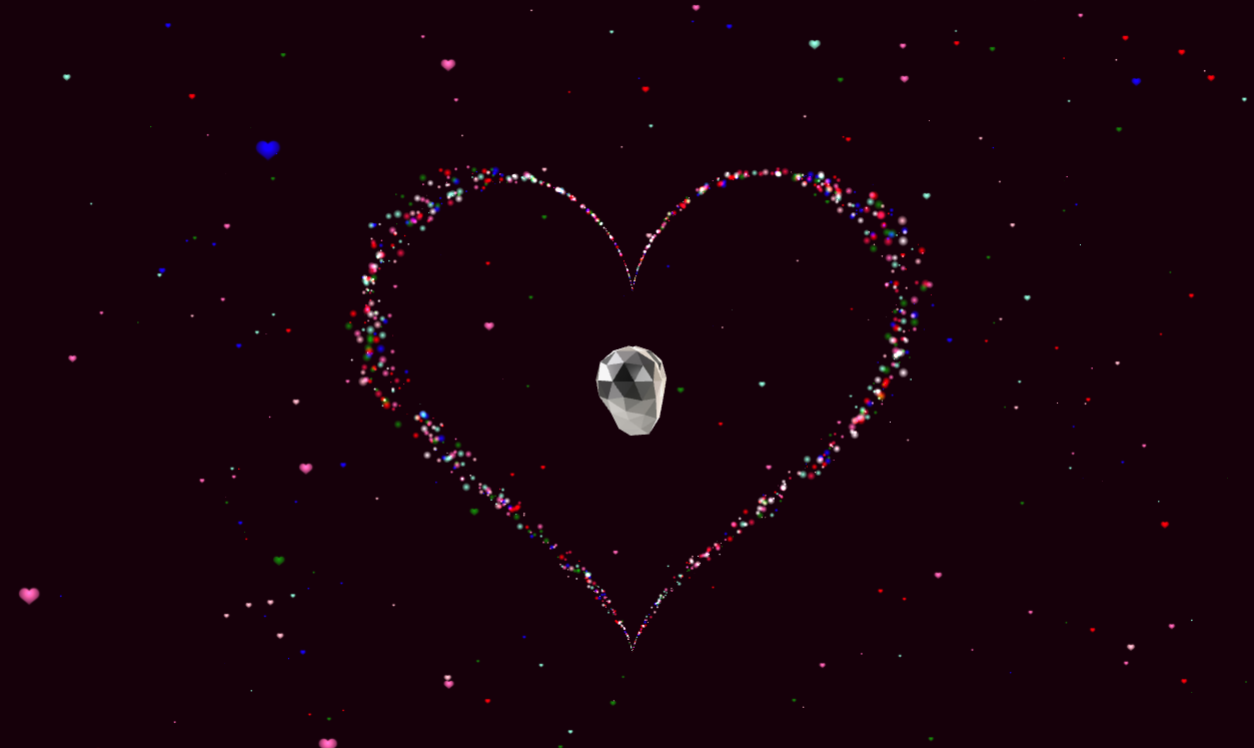
2.5 Mẫu 5: Trái Tim Thủ Khoa Lý – Đẳng Cấp Dân Công Nghệ!
Bạn muốn khoe khả năng code chuyên nghiệp của mình với crush? Mẫu trái tim Thủ Khoa Lý này sẽ giúp bạn ghi điểm tuyệt đối!
-
Mô tả: Đây là mẫu trái tim phức tạp hơn, dành cho những bạn muốn thể hiện kỹ năng code đỉnh cao. Nó có thể có hiệu ứng gradient đa sắc, 3D nhẹ nhàng khi di chuột, hoặc tương tác nhỏ khi người dùng click. Mẫu này không chỉ đẹp mà còn thể hiện sự thông minh, sáng tạo của bạn.
-
Điểm nổi bật:
- Thể hiện sự sáng tạo và kỹ năng code cao hơn, gây ấn tượng mạnh với crush và cả bạn bè.
- Gợi ý các hiệu ứng như
hover(thay đổi khi di chuột qua),transform(xoay, lật, co giãn) hoặcfilter(làm mờ, đổi màu) để tăng tính tương tác và độ ảo diệu. Theo kinh nghiệm của tôi, việc thêm một chút tương tác nhỏ như hiệu ứng hover sẽ khiến món quà của bạn trở nên ‘đắt giá’ hơn rất nhiều.
<!DOCTYPE html>
<html lang=”en”><head>
<meta charset=”UTF-8″>
<meta http-equiv=”X-UA-Compatible” content=”IE=edge”>
<meta name=”viewport” content=”width=device-width, initial-scale=1.0″>
<title>I Love You</title>
<style>
*{
margin: 0;
padding: 0;
box-sizing: border-box;
}
html,
body {
overflow: hidden;
background-color: #000 !important;
}
body {
-webkit-font-soothing: antialiased;
}
.webgl {
position: fixed;
width: 100vw;
height: 100vw;
top: 0;
left: 0;
outline: none;
}
h1{
position: absolute;
top: 10vh;
left: 2.5rem;
right: 1rem;
text-align: center;
font-size: max(1rem, 3vh);
}
button {
position: absolute;
left: 0;
top: 0;
bottom: 0;
height: 12vh;
width: 12vh;
transform: translateY(2vh);
right: 0;
margin: auto;
-webkit-appearance: none;
background: transparent;
color: inherit;
border: none;
cursor: pointer;
}
svg{
width: 3.5vh;
}
</style>
<script>
window.console = window.console || function(t) {};
</script>
<script>
if (document.location.search.match(/type=embed/gi)) {
window.parent.postMessage(“resize”, “*”);
}
</script>
</head>
<body translate=”no”>
<canvas class=”webgl” data-engine=”three.js r135″ width=”682″ height=”157″ style=”width: 682px; height: 157px;”></canvas>
<button id=”play-music” type=”button” aria-label=”Play music” style=”opacity: 1;”><svg fill=”currentColor” viewBox=”0 0 512 512″ width=”100″ title=”music”>
<!– <path d=”M470.38 1.51L150.41 96A32 32 0 0 0 128 126.51v261.41A139 139 0 0 0 96 384c-53 0-96 28.66-96 64s43 64 96 64 96-28.66 96-64V214.32l256-75v184.61a138.4 138.4 0 0 0-32-3.93c-53 0-96 28.66-96 64s43 64 96 64 96-28.65 96-64V32a32 32 0 0 0-41.62-30.49z” /> –>
</svg></button>
<script type=”x-shader/x-vertex” id=”vertexShader”>
#define M_PI 3.1415926535897932384626433832795
uniform float uTime;
uniform float uSize;
attribute float aScale;
attribute vec3 aColor;
attribute float random;
attribute float random1;
attribute float aSpeed;
varying vec3 vColor;
varying vec2 vUv;
void main() {
float sign = 2.0* (step(random, 0.5) -.5);
float t = sign*mod(-uTime * aSpeed* 0.005 + 10.0*aSpeed*aSpeed, M_PI);
float a = pow(t, 2.0) * pow((t – sign * M_PI), 2.0);
float radius = 0.14;
vec3 myOffset =
vec3(t, 1.0, 0.0);
myOffset = vec3(radius *16.0 * pow(sin(t), 2.0) * sin(t), radius * (13.0 * cos(t) – 5.0 * cos(2.0 * t) – 2.0 * cos(3.0 * t) – cos(4.0 * t)), .15*(a*(random1 – .5))*sin(abs(10.0*(sin(.2*uTime + .2*random)))*t));
vec3 displacedPosition = myOffset;
vec4 modelPosition = modelMatrix * vec4(displacedPosition.xyz, 1.0);
vec4 viewPosition = viewMatrix * modelPosition;
viewPosition.xyz += position * aScale * uSize * pow(a, .5) * .5;
gl_Position = projectionMatrix * viewPosition;
vColor = aColor;
vUv = uv;
}
</script>
<script type=”x-shader/x-fragment” id=”fragmentShader”>
varying vec3 vColor;
varying vec2 vUv;
void main() {
vec2 uv = vUv;
vec3 color = vColor;
float strength = distance(uv, vec2(0.5));
strength *= 2.0;
strength = 1.0 – strength;
gl_FragColor = vec4(strength * color, 1.0);
}
</script>
<script type=”x-shader/x-vertex” id=”vertexShader1″>
#define M_PI 3.1415926535897932384626433832795
uniform float uTime;
uniform float uSize;
attribute float aScale;
attribute vec3 aColor;
attribute float phi;
attribute float random;
attribute float random1;
varying vec3 vColor;
varying vec2 vUv;
void main() {
float t = 0.01 * uTime + 12.0;
float angle = phi;
t = mod((-uTime + 100.0) * 0.06* random1 + random *2.0 * M_PI , 2.0 * M_PI);
vec3 myOffset = vec3(5.85*cos(angle * (t )), 2.0*(t – M_PI), 3.0*sin(angle * (t )/t));
vec4 modelPosition = modelMatrix * vec4(myOffset, 1.0);
vec4 viewPosition = viewMatrix * modelPosition;
viewPosition.xyz += position * aScale * uSize;
gl_Position = projectionMatrix * viewPosition;
vColor = aColor;
vUv = uv;
}
</script>
<script type=”x-shader/x-fragment” id=”fragmentShader1″>
uniform sampler2D uTex;
varying vec3 vColor;
varying vec2 vUv;
void main() {
vec2 uv = vUv;
vec3 color = vColor;
float strength = distance(uv, vec2(0.5, .65));
strength *= 2.0;
strength = 1.0 – strength;
vec3 texture = texture2D(uTex, uv).rgb;
gl_FragColor = vec4(texture * color * (strength + .3), 1.);
}
</script>
<script src=”https://cpwebassets.codepen.io/assets/common/stopExecutionOnTimeout-2c7831bb44f98c1391d6a4ffda0e1fd302503391ca806e7fcc7b9b87197aec26.js”></script>
<script id=”rendered-js” type=”module”>
/* Poly Heart model by Quaternius [CC0] (https://creativecommons.org/publicdomain/zero/1.0/) via Poly Pizza (https://poly.pizza/m/1yCRUwFnwX)
*/
import * as THREE from “https://cdn.skypack.dev/three@0.135.0”;
import { gsap } from “https://cdn.skypack.dev/gsap@3.8.0”;
import { GLTFLoader } from “https://cdn.skypack.dev/three@0.135.0/examples/jsm/loaders/GLTFLoader”;
class World {
constructor({
canvas,
width,
height,
cameraPosition,
fieldOfView = 75,
nearPlane = 0.1,
farPlane = 100 })
{
this.parameters = {
count: 1500,
max: 12.5 * Math.PI,
a: 2,
c: 4.5 };
this.textureLoader = new THREE.TextureLoader();
this.scene = new THREE.Scene();
this.scene.background = new THREE.Color(0x16000a);
this.clock = new THREE.Clock();
this.data = 0;
this.time = { current: 0, t0: 0, t1: 0, t: 0, frequency: 0.0005 };
this.angle = { x: 0, z: 0 };
this.width = width || window.innerWidth;
this.height = height || window.innerHeight;
this.aspectRatio = this.width / this.height;
this.fieldOfView = fieldOfView;
this.camera = new THREE.PerspectiveCamera(
fieldOfView,
this.aspectRatio,
nearPlane,
farPlane);
this.camera.position.set(
cameraPosition.x,
cameraPosition.y,
cameraPosition.z);
this.scene.add(this.camera);
this.renderer = new THREE.WebGLRenderer({
canvas,
antialias: true });
this.pixelRatio = Math.min(window.devicePixelRatio, 2);
this.renderer.setPixelRatio(this.pixelRatio);
this.renderer.setSize(this.width, this.height);
this.timer = 0;
this.addToScene();
this.addButton();
this.render();
this.listenToResize();
this.listenToMouseMove();
}
start() {}
render() {
this.renderer.render(this.scene, this.camera);
this.composer && this.composer.render();
}
loop() {
this.time.elapsed = this.clock.getElapsedTime();
this.time.delta = Math.min(
60,
(this.time.current – this.time.elapsed) * 1000);
if (this.analyser && this.isRunning) {
this.time.t = this.time.elapsed – this.time.t0 + this.time.t1;
this.data = this.analyser.getAverageFrequency();
this.data *= this.data / 2000;
this.angle.x += this.time.delta * 0.001 * 0.63;
this.angle.z += this.time.delta * 0.001 * 0.39;
const justFinished = this.isRunning && !this.sound.isPlaying;
if (justFinished) {
this.time.t1 = this.time.t;
this.audioBtn.disabled = false;
this.isRunning = false;
const tl = gsap.timeline();
this.angle.x = 0;
this.angle.z = 0;
tl.to(this.camera.position, {
x: 0,
z: 4.5,
duration: 4,
ease: “expo.in” });
tl.to(this.audioBtn, {
opacity: () => 1,
duration: 1,
ease: “power1.out” });
} else {
this.camera.position.x = Math.sin(this.angle.x) * this.parameters.a;
this.camera.position.z = Math.min(
Math.max(Math.cos(this.angle.z) * this.parameters.c, 1.75),
6.5);
}
}
this.camera.lookAt(this.scene.position);
if (this.heartMaterial) {
this.heartMaterial.uniforms.uTime.value +=
this.time.delta * this.time.frequency * (1 + this.data * 0.2);
}
if (this.model) {
this.model.rotation.y -= 0.0005 * this.time.delta * (1 + this.data);
}
if (this.snowMaterial) {
this.snowMaterial.uniforms.uTime.value +=
this.time.delta * 0.0004 * (1 + this.data);
}
this.render();
this.time.current = this.time.elapsed;
requestAnimationFrame(this.loop.bind(this));
}
listenToResize() {
window.addEventListener(“resize”, () => {
// Update sizes
this.width = window.innerWidth;
this.height = window.innerHeight;
// Update camera
this.camera.aspect = this.width / this.height;
this.camera.updateProjectionMatrix();
this.renderer.setSize(this.width, this.height);
});
}
listenToMouseMove() {
window.addEventListener(“mousemove”, e => {
const x = e.clientX;
const y = e.clientY;
gsap.to(this.camera.position, {
x: gsap.utils.mapRange(0, window.innerWidth, 0.2, -0.2, x),
y: gsap.utils.mapRange(0, window.innerHeight, 0.2, -0.2, -y) });
});
}
addHeart() {
this.heartMaterial = new THREE.ShaderMaterial({
fragmentShader: document.getElementById(“fragmentShader”).textContent,
vertexShader: document.getElementById(“vertexShader”).textContent,
uniforms: {
uTime: { value: 0 },
uSize: { value: 0.2 },
uTex: {
value: new THREE.TextureLoader().load(
“https://assets.codepen.io/74321/heart.png”) } },
depthWrite: false,
blending: THREE.AdditiveBlending,
transparent: true });
const count = this.parameters.count; //2000
const scales = new Float32Array(count * 1);
const colors = new Float32Array(count * 3);
const speeds = new Float32Array(count);
const randoms = new Float32Array(count);
const randoms1 = new Float32Array(count);
const colorChoices = [
“white”,
“red”,
“pink”,
“crimson”,
“hotpink”,
“green”,
“aquamarine”,
“blue”];
const squareGeometry = new THREE.PlaneGeometry(1, 1);
this.instancedGeometry = new THREE.InstancedBufferGeometry();
Object.keys(squareGeometry.attributes).forEach(attr => {
this.instancedGeometry.attributes[attr] = squareGeometry.attributes[attr];
});
this.instancedGeometry.index = squareGeometry.index;
this.instancedGeometry.maxInstancedCount = count;
for (let i = 0; i < count; i++) {
const phi = Math.random() * Math.PI * 2;
const i3 = 3 * i;
randoms[i] = Math.random();
randoms1[i] = Math.random();
scales[i] = Math.random() * 0.35;
const colorIndex = Math.floor(Math.random() * colorChoices.length);
const color = new THREE.Color(colorChoices[colorIndex]);
colors[i3 + 0] = color.r;
colors[i3 + 1] = color.g;
colors[i3 + 2] = color.b;
speeds[i] = Math.random() * this.parameters.max;
}
this.instancedGeometry.setAttribute(
“random”,
new THREE.InstancedBufferAttribute(randoms, 1, false));
this.instancedGeometry.setAttribute(
“random1”,
new THREE.InstancedBufferAttribute(randoms1, 1, false));
this.instancedGeometry.setAttribute(
“aScale”,
new THREE.InstancedBufferAttribute(scales, 1, false));
this.instancedGeometry.setAttribute(
“aSpeed”,
new THREE.InstancedBufferAttribute(speeds, 1, false));
this.instancedGeometry.setAttribute(
“aColor”,
new THREE.InstancedBufferAttribute(colors, 3, false));
this.heart = new THREE.Mesh(this.instancedGeometry, this.heartMaterial);
console.log(this.heart);
this.scene.add(this.heart);
}
addToScene() {
this.addModel();
this.addHeart();
this.addSnow();
}
async addModel() {
this.model = await this.loadObj(
“https://assets.codepen.io/74321/heart.glb”);
this.model.scale.set(0.01, 0.01, 0.01);
this.model.material = new THREE.MeshMatcapMaterial({
matcap: this.textureLoader.load(
“https://assets.codepen.io/74321/3.png”,
() => {
gsap.to(this.model.scale, {
x: 0.35,
y: 0.35,
z: 0.35,
duration: 1.5,
ease: “Elastic.easeOut” });
}),
color: “#fff” });
this.scene.add(this.model);
}
addButton() {
this.audioBtn = document.querySelector(“button”);
this.audioBtn.addEventListener(“click”, () => {
this.audioBtn.disabled = true;
if (this.analyser) {
this.sound.play();
this.time.t0 = this.time.elapsed;
this.data = 0;
this.isRunning = true;
gsap.to(this.audioBtn, {
opacity: 0,
duration: 1,
ease: “power1.out” });
} else {
this.loadMusic().then(() => {
console.log(“music loaded”);
});
}
});
}
loadObj(path) {
const loader = new GLTFLoader();
return new Promise(resolve => {
loader.load(
path,
response => {
resolve(response.scene.children[0]);
},
xhr => {},
err => {
console.log(err);
});
});
}
loadMusic() {
return new Promise(resolve => {
const listener = new THREE.AudioListener();
this.camera.add(listener);
// create a global audio source
this.sound = new THREE.Audio(listener);
const audioLoader = new THREE.AudioLoader();
audioLoader.load(
“https://res.cloudinary.com/dmnxeusyw/video/upload/v1668310333/sharecs.net/music_ji3iak.mp3”,
buffer => {
this.sound.setBuffer(buffer);
this.sound.setLoop(false);
this.sound.setVolume(0.5);
this.sound.play();
this.analyser = new THREE.AudioAnalyser(this.sound, 32);
// get the average frequency of the sound
const data = this.analyser.getAverageFrequency();
this.isRunning = true;
this.t0 = this.time.elapsed;
resolve(data);
},
progress => {
gsap.to(this.audioBtn, {
opacity: () => 1 – progress.loaded / progress.total,
duration: 1,
ease: “power1.out” });
},
error => {
console.log(error);
});
});
}
addSnow() {
this.snowMaterial = new THREE.ShaderMaterial({
fragmentShader: document.getElementById(“fragmentShader1”).textContent,
vertexShader: document.getElementById(“vertexShader1”).textContent,
uniforms: {
uTime: { value: 0 },
uSize: { value: 0.3 },
uTex: {
value: new THREE.TextureLoader().load(
“https://assets.codepen.io/74321/heart.png”) } },
depthWrite: false,
blending: THREE.AdditiveBlending,
transparent: true });
const count = 550;
const scales = new Float32Array(count * 1);
const colors = new Float32Array(count * 3);
const phis = new Float32Array(count);
const randoms = new Float32Array(count);
const randoms1 = new Float32Array(count);
const colorChoices = [“red”, “pink”, “hotpink”, “green”, “aquamarine”, “blue”];
const squareGeometry = new THREE.PlaneGeometry(1, 1);
this.instancedGeometry = new THREE.InstancedBufferGeometry();
Object.keys(squareGeometry.attributes).forEach(attr => {
this.instancedGeometry.attributes[attr] = squareGeometry.attributes[attr];
});
this.instancedGeometry.index = squareGeometry.index;
this.instancedGeometry.maxInstancedCount = count;
for (let i = 0; i < count; i++) {
const phi = (Math.random() – 0.5) * 10;
const i3 = 3 * i;
phis[i] = phi;
randoms[i] = Math.random();
randoms1[i] = Math.random();
scales[i] = Math.random() * 0.35;
const colorIndex = Math.floor(Math.random() * colorChoices.length);
const color = new THREE.Color(colorChoices[colorIndex]);
colors[i3 + 0] = color.r;
colors[i3 + 1] = color.g;
colors[i3 + 2] = color.b;
}
this.instancedGeometry.setAttribute(
“phi”,
new THREE.InstancedBufferAttribute(phis, 1, false));
this.instancedGeometry.setAttribute(
“random”,
new THREE.InstancedBufferAttribute(randoms, 1, false));
this.instancedGeometry.setAttribute(
“random1”,
new THREE.InstancedBufferAttribute(randoms1, 1, false));
this.instancedGeometry.setAttribute(
“aScale”,
new THREE.InstancedBufferAttribute(scales, 1, false));
this.instancedGeometry.setAttribute(
“aColor”,
new THREE.InstancedBufferAttribute(colors, 3, false));
this.snow = new THREE.Mesh(this.instancedGeometry, this.snowMaterial);
this.scene.add(this.snow);
}}
const world = new World({
canvas: document.querySelector(“canvas.webgl”),
cameraPosition: { x: 0, y: 0, z: 4.5 } });
world.loop();
//# sourceURL=pen.js
</script>
</body>
</html>
3. Hướng Dẫn Gửi Gắm Yêu Thương Bằng Code Trái Tim
Tạo xong siêu phẩm rồi, giờ là lúc gửi gắm yêu thương đến crush! Có nhiều cách để bạn chia sẻ code trái tim của mình, tùy thuộc vào mức độ vọc vạch của bạn và crush nhé!
3.1 Chia Sẻ Trực Tiếp Qua File HTML/CSS
Đây là cách đơn giản và phổ biến nhất, đảm bảo crush của bạn sẽ nhận được tác phẩm y nguyên như bạn đã tạo ra.
- Cách làm:
- Lưu file HTML: Sau khi hoàn thành code, bạn hãy lưu file HTML với tên bất kỳ (ví dụ:
to_tinh_crush.html) và file CSS (nếu có) với tênstyle.css(đảm bảo file HTML đã liên kết đúng đến file CSS này). - Gửi cho crush: Bạn có thể gửi cả hai file này qua email, Zalo, Messenger, Telegram hoặc bất kỳ ứng dụng chia sẻ file nào. Đừng quên nhắn crush mở file
.htmlbằng trình duyệt web nhé!
- Lưu file HTML: Sau khi hoàn thành code, bạn hãy lưu file HTML với tên bất kỳ (ví dụ:
- Ưu điểm: Đơn giản, dễ thực hiện, giữ nguyên được code gốc và các hiệu ứng một cách hoàn hảo.
3.2 Nhúng Vào Trang Web/Blog Cá Nhân
Nếu bạn là một người có blog hoặc trang web cá nhân riêng, đây là cách thể hiện sự chuyên nghiệp và sáng tạo của bạn!
- Cách làm:
- Copy code: Bạn chỉ cần copy đoạn code HTML (thường là phần
divchứa trái tim) và CSS đã tạo. - Nhúng vào trang web: Paste đoạn code này vào phần
<body>của trang web hoặc blog cá nhân của bạn. Đảm bảo các style CSS được khai báo đúng cách (có thể đặt trong thẻ<style>hoặc liên kết đến file CSS riêng). - Chia sẻ link: Sau đó, bạn chỉ cần gửi link code trái tim html của trang web đó cho crush.
- Copy code: Bạn chỉ cần copy đoạn code HTML (thường là phần
- Ưu điểm: Chuyên nghiệp, dễ dàng chia sẻ qua một đường link duy nhất, và crush có thể xem ngay mà không cần tải file.
3.3 Cách Gửi Code Trái Tim Qua Tin Nhắn (Zalo, Messenger, Telegram)
Đây là cách nhanh chóng và bất ngờ nhất, nhưng cũng cần lưu ý một chút về khả năng hiển thị.
- Cách làm:
- Copy đoạn HTML: Bạn copy đoạn code HTML đã hoàn thiện (chỉ phần
<body>hoặcdivchứa trái tim, không bao gồm<head>và<html>nếu bạn chỉ muốn gửi phần hiển thị). - Paste vào khung chat: Dán trực tiếp đoạn code này vào khung chat của Zalo, Messenger, Telegram. Một số nền tảng có thể tự động render (hiển thị) code HTML thành hình ảnh trái tim, nhưng cũng có những nền tảng chỉ hiển thị dưới dạng văn bản.
- Copy đoạn HTML: Bạn copy đoạn code HTML đã hoàn thiện (chỉ phần
- Ưu điểm: Nhanh chóng, tạo yếu tố bất ngờ cao.
- Lưu ý quan trọng: Nhiều người thường lầm tưởng rằng việc gửi code qua tin nhắn sẽ luôn hiển thị đẹp, nhưng thực tế là không phải nền tảng nào cũng hỗ trợ tốt. Vì vậy, hãy chuẩn bị phương án dự phòng! Để đảm bảo crush vẫn thấy được siêu phẩm của bạn, hãy cân nhắc:
- Gửi dưới dạng link: Nếu bạn đã nhúng code vào trang web cá nhân, hãy gửi link.
- Gửi ảnh chụp màn hình/video: Nếu ứng dụng nhắn tin không hỗ trợ hiển thị code, hãy chụp màn hình hoặc quay video ngắn về trái tim đang hoạt động và gửi cho crush kèm lời nhắn ‘Đây là thứ anh/em đã code riêng cho em/anh đó!’.
4. FAQ Về Trend Code Trái Tim
Chúng mình biết bạn có ti tỉ câu hỏi về trend code trái tim này, nên đã tổng hợp và giải đáp ngay đây rồi!
Làm sao để tải code trái tim miễn phí ở đâu?
Bạn có thể tải code trái tim miễn phí trực tiếp từ các mẫu code được cung cấp trong bài viết này. Ngoài ra, các trang web như CodePen, GitHub hay Stack Overflow cũng là những nguồn tài nguyên tuyệt vời để tìm kiếm và tham khảo các mẫu code trái tim khác.
Em không rành code lắm, có làm được code trái tim đập có tên đơn giản không?
Chắc chắn rồi! Các mẫu code trong bài đã được tối ưu để dễ hiểu và dễ tùy chỉnh nhất cho người mới bắt đầu. Chỉ cần làm theo hướng dẫn từng bước, bạn sẽ có ngay một trái tim đập với tên crush cực xịn mà không cần kiến thức chuyên sâu về lập trình.
Có thể dùng code trái tim python để làm những hiệu ứng tương tự không?
Hoàn toàn có thể! Python cũng có các thư viện đồ họa như Tkinter hay Pygame để vẽ hình và tạo hiệu ứng động. Tuy nhiên, HTML/CSS là lựa chọn phổ biến và dễ dàng nhất để hiển thị trực tiếp trên trình duyệt web, đặc biệt là khi bạn muốn chia sẻ nhanh chóng và rộng rãi, vì hầu hết mọi thiết bị đều có trình duyệt.
Em muốn tìm thêm link code trái tim html để tham khảo thì tìm ở đâu?
Ngoài bài viết này, bạn có thể tìm kiếm trên các nền tảng chia sẻ code như CodePen (tìm kiếm “HTML CSS heart animation”), GitHub (tìm các repository “valentine heart code”), hoặc các diễn đàn lập trình như Stack Overflow. Đây là những nguồn rất phong phú để bạn tham khảo và học hỏi thêm.
Cách làm code trái tim có tên có khó không? Cần lưu ý gì?
Không hề khó! Để thêm tên vào trái tim, bạn chỉ cần chèn một thẻ <span> hoặc <p> vào trong phần HTML của trái tim và định dạng bằng CSS. Lưu ý chọn font chữ dễ đọc, màu sắc hài hòa với màu trái tim và vị trí đặt tên sao cho tinh tế để tên crush nổi bật và đẹp mắt nhất nhé!
5. Lời Kết: Mã Hóa Yêu Thương, Chinh Phục Crush Thành Công
Vậy là chúng ta đã cùng nhau khám phá mọi điều về trend code trái tim đang được giới trẻ yêu thích! Từ những mẫu trái tim đơn giản, tinh tế đến những siêu phẩm lấp lánh, biết đập, hay có tên riêng của crush – tất cả đều là cách tuyệt vời để bạn thể hiện tình cảm độc đáo và sáng tạo. Đây không chỉ là việc tạo ra một hình ảnh, mà là thông điệp yêu thương được mã hóa bằng chính tâm huyết của bạn.
Đừng ngần ngại thử ngay các mẫu code chúng mình đã chia sẻ, tùy chỉnh theo phong cách riêng và tự tin gửi cho crush của mình nhé! Chắc chắn rằng, sự đầu tư và sáng tạo này sẽ khiến người ấy cảm thấy vô cùng đặc biệt và ấn tượng. Ai mà chẳng thích một món quà độc nhất vô nhị, đúng không nào?
Chúc bạn thành công trong việc mã hóa yêu thương và nhận được cái gật đầu ngọt ngào từ người ấy! Đừng quên chia sẻ tác phẩm của mình với bạn bè để cả làng cùng bắt trend code trái tim này nhé.








0 Lời bình